


AI-assisted CAD automation

Professional software for faster engineering and CAD workflows.

FWCAD Solutions develops automation software for CAD, BIM, and construction engineering teams. We combine AI-assisted logic, optimization algorithms, rule-based systems, and hands-on engineering experience to turn repetitive production work into reliable automated workflows.

Our product line includes FIMSO, a complete formwork automation solution, and DIMTool, a fast AutoCAD utility for dimension arrangement and part dimension creation. We also develop custom applications for specialized engineering workflows.

AI-assisted automation Optimization engines Rule-based systems Autodesk workflows
CAD automation workspace with formwork layout, arranged dimensions, and engineering checks

Automate the engineering work that slows production down.

FWCAD is built around a simple direction: capture practical engineering rules, convert them into dependable software logic, and place that automation inside the tools teams already use. The result is faster drafting, fewer manual checks, more consistent output, and workflows that scale beyond individual operator habits.

Software shaped by engineering reality, not generic automation.

CAD automation is only useful when it understands the constraints behind the drawing. Our development process combines field-aware engineering judgment with structured software methods.

01

Engineering Rule Modeling

We translate manual design decisions, company standards, product catalogs, clearances, preferred items, and exceptions into rule-based logic that can be repeated consistently.

02

Optimization and Search

We use optimization strategies to evaluate valid layout alternatives, reduce repetitive trial-and-error, and help teams reach practical production-ready results faster.

03

AI-Assisted Workflows

We apply AI where it adds value: recognizing patterns, supporting decisions, classifying geometry, accelerating setup, and assisting complex automation workflows.

04

Autodesk Integration

We build for real CAD and BIM production environments, including AutoCAD utilities, Revit workflows, DWG data, model elements, commands, families, and deliverable drawings.

A focused product ecosystem for CAD automation.

FIMSO and DIMTool are current products, but they represent a wider direction: complete engineering systems, quick productivity tools, and customized software for teams with specific workflows.

Quick Utility

DIMTool

A fast AutoCAD productivity tool for arranging dimensions and automatically creating part dimensions from selected geometry.

View DIMTool
Custom Apps

Customized Applications

Purpose-built CAD, BIM, and engineering software for teams that need their own rules, calculations, data flows, and deliverables automated.

Discuss a workflow

AI, optimization, rules, and engineering experience working together.

We do not treat automation as a single command. For complex workflows, the software must understand geometry, evaluate constraints, apply standards, choose from valid alternatives, and give engineers control where judgment is required.

AI-assisted setup Pattern recognition
Rule-based engines Standards and constraints
Optimization logic Faster valid options
Engineer control Manual refinement

FIMSO is a complete formwork design and automation solution.

In development

FIMSO

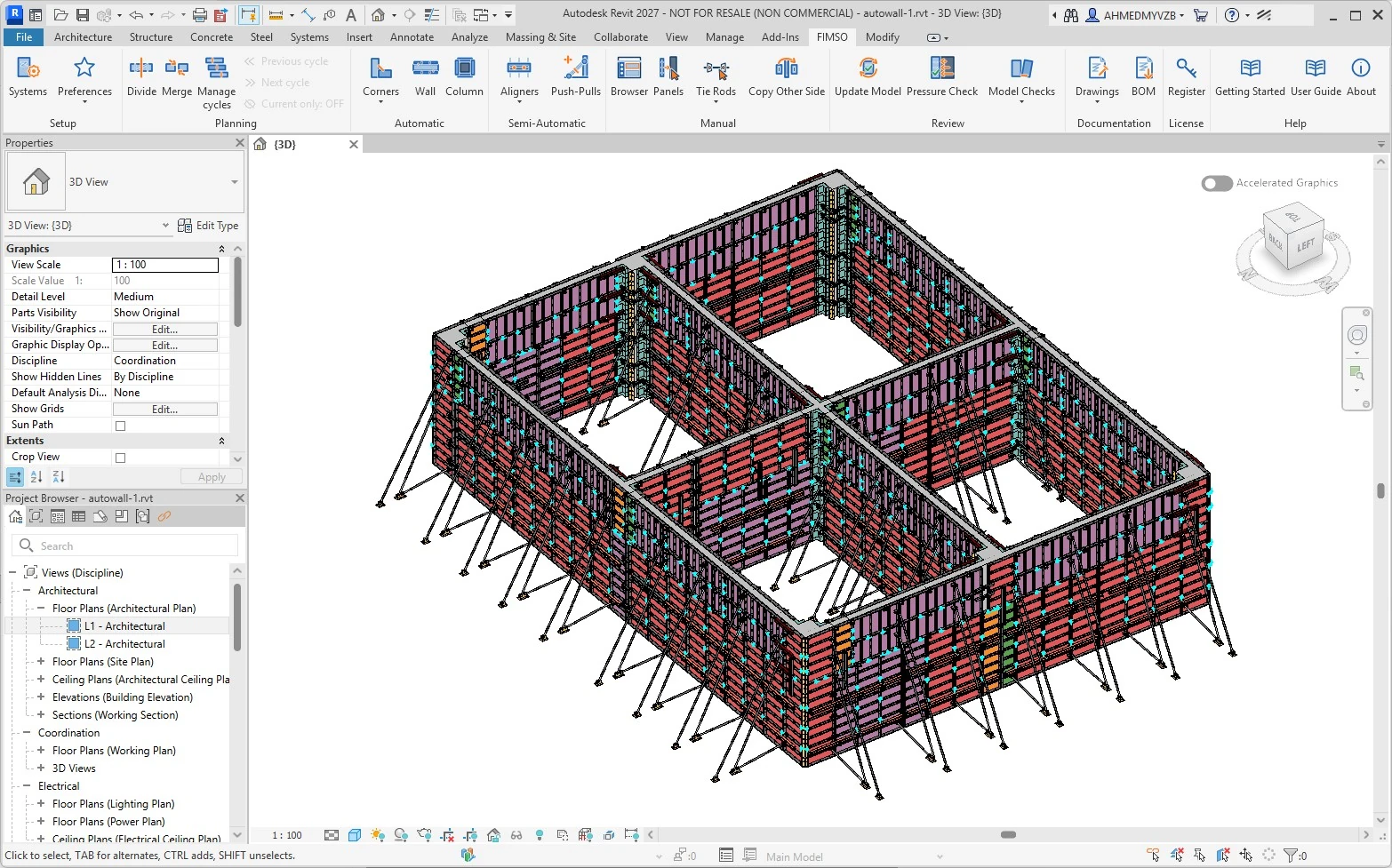
FIMSO is built for contractors, formwork engineers, BIM teams, and CAD operators who need to convert project wall and column geometry into practical formwork layouts.

The system connects design geometry with construction constraints. Teams can load a formwork system, define stock and preferred items, then generate and refine wall panels, corners, wall ends, fillers, tie rods, couplers, aligners, push-pulls, and related items.

  • Manual, semi-automatic, and automatic layout workflows.
  • Consistent formwork system data across AutoCAD and Revit workflows.
  • Rule-based placement logic shaped by practical construction constraints.
Complete workflow scope Designed for full formwork layout production, not a single drafting shortcut.
Construction-aware output Uses system data, stock preferences, and practical placement constraints.
Engineer-in-control automation Automates repetitive placement while allowing manual refinement where judgment is needed.

DIMTool speeds up common AutoCAD dimensioning tasks.

DIMTool is intentionally lightweight: a quick AutoCAD utility for daily dimensioning tasks that should not require a heavy setup process. It helps users arrange selected linear dimensions around nearby 2D geometry and automatically create part dimensions from selected objects.

It is a focused productivity tool beside FIMSO. Where FIMSO targets a complete engineering workflow, DIMTool removes friction from repeated drafting actions and helps keep drawings cleaner with less manual adjustment.

Dimension arrangement Repositions supported dimensions to improve readability and reduce clashes.
Part dimensions Creates baseline or continuous dimensions from selected geometry.
Fast adoption Built as a practical AutoCAD utility for immediate workflow improvement.
DIMTool arranging AutoCAD dimensions around selected part geometry
One-click dimension arrangement Clean up selected dimensions and reduce manual repositioning around part geometry.
DIMTool automatically creating part dimensions in AutoCAD
Automatic part dimensioning Create baseline or continuous dimensions from selected geometry with less drafting effort.

Watch DIMTool in action.

See how the tool supports fast dimension arrangement and automatic dimension creation inside AutoCAD workflows.

Open demo on YouTube

Install DIMTool for AutoCAD.

The current downloadable setup package is available as a Windows MSI installer.

MSI Setup

FWCAD DIMTool AutoCAD Setup

Download the installer for the DIMTool AutoCAD utility.

Download MSI

Customized applications for engineering teams with unique workflows.

FWCAD develops specialized software when off-the-shelf tools cannot match the way your team designs, checks, documents, or delivers work.

Workflow Discovery

We study the current manual process, sample drawings or models, engineering rules, exceptions, input data, approval steps, and expected deliverables.

Automation Engine

We build the rule logic, geometry processing, optimization strategy, AI-assisted steps, and Autodesk integration needed for dependable production use.

Deployment and Refinement

We deliver usable tools, improve them with real project feedback, and keep the workflow practical for engineers, CAD operators, and managers.

Where FWCAD can help.

Repeated CAD or BIM tasks When teams spend hours applying the same drawing, modeling, checking, or documentation steps.
Engineering rules hidden in manual work When only experienced engineers know how decisions are made and output consistency depends on individuals.
Geometry-heavy production problems When the workflow depends on object selection, layout generation, collision handling, dimensions, quantities, or model data.
Need for faster deliverables When deadlines require a more automated path from input geometry to checked production output.

Have a workflow that should be automated?

Send the platform, software version, sample inputs, engineering rules, current manual steps, and expected output. For FIMSO discussions, include the formwork system and target AutoCAD or Revit workflow.